The Inspire Toolbar provides shortcuts to the tasks performed most frequently. Where applicable, click on the option below for more information.
| Button | Description |
|
Adds, edits, or selects a patient in the Noah 4 or PatientBase database. Only displays if Inspire was launched from within Noah 4 or PatientBase. |
|
Views the audiogram being used in the current session and adds or edits audiogram data for the selected patient. Only displays if Inspire was launched from within Noah 4 or PatientBase. |
|
Opens a saved session. |
|
Saves the current session to the database and/or cloud. |
|
Prints and/or previews a report. |
|
Reverses the most recent action. |
|
Reverses multiple actions. |
|
Launches Media Player. |
|
Selects a different fitting formula. |
|
Launches the Fitting Formula Options screen. This button is only available if fitting formula DSL v5 is selected. |
|
Launches the TeleHear Portal for remote services. |
|
Launches Audiology on Demand. This button is only available if the PC has Internet access. |
|
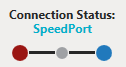
Indicates the connection status of the hearing aid(s) and programmer currently being used in a fitting. Only displays during a live fitting. |