Click on the Read Device Settings or Load a Previous Session radio button and then click Start.
| Note: If custom DSL v5 data was entered during a previous fitting session, click Load a Previous Session to retrieve the session and use the custom data in the fitting. If 'Read Device Settings' is selected, the Average RECD and REUG will be used in the fitting and the custom DSL v5 data will not be available. |
 to the right of DSL
v5 on the Inspire Toolbar to access.
to the right of DSL
v5 on the Inspire Toolbar to access.
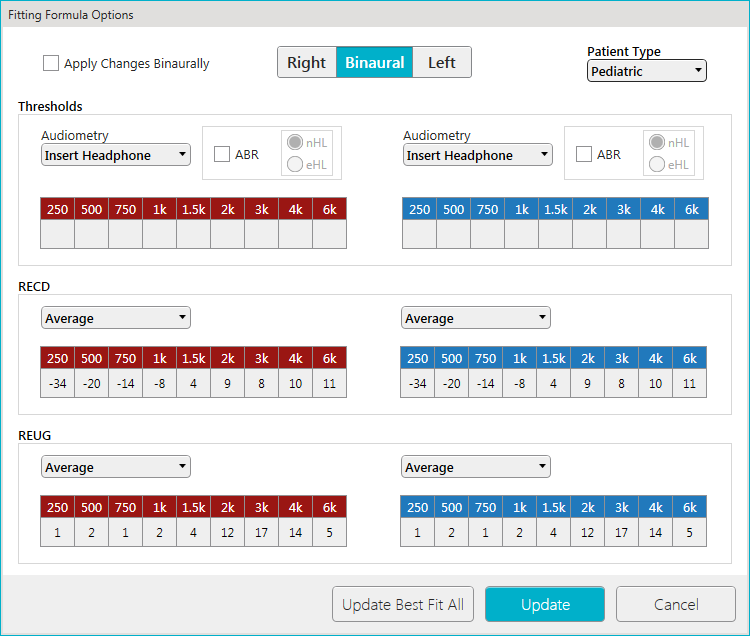

| Note: If custom RECD and/or REUG data is entered, it's not applied binaurally. |
| Note: The patient type defaults to Pediatric for patients less than 18 years of age and Adult for patients greater than 18 years of age. Generally, the Pediatric value results in a higher-gain target than the Adult value; therefore, the parameter may also be interpreted as an assessment of patient experience, with a value of Pediatric corresponding to an experienced patient and a value of Adult corresponding to a novice patient. In addition, the Binaural Correction value selected via Target Preferences is only applied to Adults. |
| Note: The Audiometry type selected via Target Preferences automatically defaults. |
| Note: The ABR option selected via Target Preferences automatically defaults. This checkbox is only available if audiometry type Insert Headphone or Insert Earmold was selected. |
| Note: These buttons are only enabled if ABR is checked. The nHL/eHL option selected via Target Preferences automatically defaults. If nHL is selected, the nHL-to-eHL conversion is shown. This conversion cannot be changed via this screen, but rather, must be changed via Target Preferences. |
| Note: If the hearing aid supports real ear and measured data has been stored in the device, the type REM Target Match, Advanced Real Ear or Integrated Real Ear will be available. Selecting Average results in the usage of predicted RECD values, corresponding to HA2/Earmold values for BTE products with earhook, and HA1/Foam-Plug values otherwise. These predicted values are displayed, but cannot be modified. Selection of a type other than Average or REM Target Match/Advanced Real Ear/Integrated Real Ear indicates that custom RECD data is to be entered, with the data corresponding to the selected coupler/ear transducer combination. Custom RECD data will be used during assessment to determine air-conduction thresholds (and hence REAR targets) when the RECD selection ear-coupling component and the audiometry transducer are consistent for the given style (i.e., Earmold and Insert-Earmold, or Foam Plug and Insert-Headphone). Custom RECD will be used during verification to determine 2cc targets when the RECD selection ear-coupling component and hearing aid style are consistent (i.e., Earmold and BTE with earhook, Foam Plug otherwise). The most accurate targets will result when custom data at all frequencies is entered (the more frequencies the better). |
| Note: If the hearing aid supports REM Target Match and measured data has been stored in the device, the type REM Target Match will be available. Selecting Average results in the usage of predicted REUG values, corresponding to Sound Field 0° values. These predicted values are displayed but cannot be modified. Selection of a type other than Average or REM Target Match indicates that custom REUG data is to be entered, with the data corresponding to the sound field selection. Custom REUG data will be used during assessment to determine air-conduction thresholds (and hence REAR targets) when the REUG selection azimuth matches the audiometry transducer azimuth (i.e., Sound Field 0° and Loudspeaker 0°, Sound Field 45° and Loudspeaker 45°, or Sound Field 90° and Loudspeaker 90°). Custom REUG data will be used during verification to determine REUG targets when the REUG selection azimuth is 0° (i.e., Sound Field 0°). The most accurate targets will result when custom data at all frequencies is entered (the more frequencies the better). |
| Note: These buttons are only enabled if a change was made. |
| Tip: Click Cancel to discard the changes or to close the screen. |
 or
or
 on the Inspire Toolbar to save the DSL v5 data.
| Note: If custom DSL v5 data was applied, it's not stored in the hearing aid(s), therefore, if this data is desired to view or retrieve during a later session, you must save the session. |
| Tip: Click File or Inspire (if Noah 3 is installed) from the Menu Bar and click Save to save the session. |