Left Navigation Bar and Menu
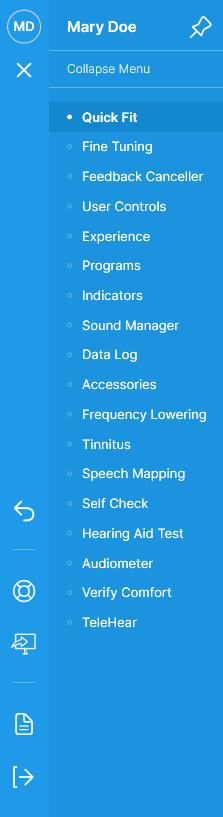
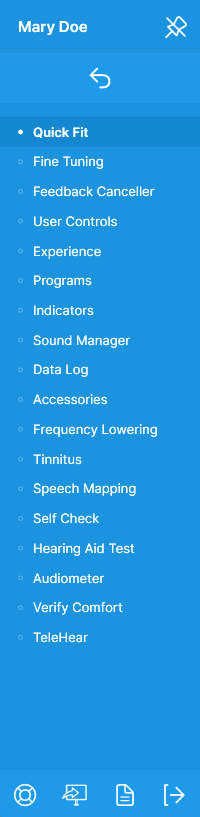
The Left Navigation Bar provides shortcuts to frequently performed tasks and access to all fitting features via an expandable menu. If desired, the bar can be pinned to remain expanded. If pinned, some of the buttons will be hidden, while others will move to the top or bottom of the bar.
| Left Navigation Bar Unpinned | Left Navigation Bar and Menu Unpinned | Left Navigation Bar and Menu Pinned | Button | Description |
 |
 |
 |
 |
Patient's initials. Expands and collapses the menu. |
 |
Pins the menu to remain expanded. | |||
 |
Unpins and collapses the menu. Clicking Restore to Pro Fit Defaults via User Preferences also unpins and collapses the menu. | |||
 |
Expands the menu to access fitting features. | |||
 |
Collapses the menu. | |||
 |
Hearing aid(s) is locked. | |||
 |
Alerts are available. | |||
 |
Reverses the most recent action. | |||
 |
Expands the Help & Support menu to launch Troubleshooting to address patient complaints and provide solutions, Report a Problem to submit log files, and Audiology on Demand for live remote assistance. | |||
 |
Launches Fitting Summary for an overview of the patient's hearing aid features and settings information. | |||
 |
Launches Session Notes. | |||
 |
Saves and ends the fitting session. |
If a firmware update is available, session notes are incomplete, or hearing aid configuration issues (e.g., multiple programs are enabled, but the patient cannot access them, tinnitus is disabled, etc.), an alert displays on the Left Navigation Bar. Details regarding the conflict(s) and hyperlinks to applicable screens display in a tooltip by pointing to the alert 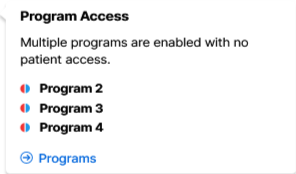 . If there are multiple conflicts, they're listed in order of importance. Once the conflict(s) are resolved, the alert disappears.