Click Undo  on the Inspire Toolbar to reverse the most recent action.
| Tip: Click Edit from the Menu Bar and click Undo. |
Undo reverses the most recent or multiple actions and Redo reverses the most recent undo action.
Click Undo on the Inspire Toolbar to reverse the most recent action.
| Tip: Click Edit from the Menu Bar and click Undo. |
Click Undo history  to the right of the Undo button on the Inspire Toolbar and a list of actions displays.
| Note: Actions are listed in reverse chronological order, with the most recent action at the top, and are referenced by the ear adjusted. |
Select one or more consecutive actions from the list to undo. The status at the bottom of the list indicates the number of items currently selected to be undone.
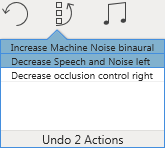
Click on the last action to undo.
Click Edit from the Menu Bar and click Redo to reverse the most recent undone action.
| Tip: If multiple actions were undone, repeat this step to reverse the next most recent undone action. Repeat this step as desired. Once all undone actions have been reversed, 'Redo' is disabled. |